> ## Documentation Index
> Fetch the complete documentation index at: https://invopop-singapore.mintlify.site/llms.txt
> Use this file to discover all available pages before exploring further.
# KSeF Poland Guide
> Generate and issue electronic invoices through Poland's KSeF system
## Introduction
On June 30, 2025, Poland's Ministry of Finance released KSeF 2.0. This update includes the publication of the FA(3) Schema, the API 2.0 documentation and supporting materials. FA(3) will become mandatory for large taxpayers on February 2026 and will roll out for other taxpayers on April 2026. Invopop will help you meet these deadlines, [get in touch with us](mailto:support@invopop.com).
KSeF (Krajowy System e-Faktur) is Poland’s official national platform for electronic invoicing, established and operated by the [Ministry of Finance](https://www.gov.pl/web/finanse). KSeF with the FA\_VAT format aim to increase transparency, streamline VAT compliance, and reduce tax fraud in business-to-business (B2B) invoicing.
Invoices are encoded in FA\_VAT, a strict XML format published and maintained by Polish tax authorities. The schema enforces standardized fields for both domestic and cross-border transactions, including buyer/seller data, VAT details, and item lines.
The KSeF system performs real-time validation of all submitted invoices, checking against the schema and business rules. Validated invoices receive a unique KSeF ID and official ‘receipt’ timestamp. The platform provides secure archiving for issued and received e-invoices.
Parties can access, verify, and download invoices using authentication methods prescribed by Polish law, such as qualified electronic signatures, trusted profiles, or dedicated system tokens. KSeF ensures strict regulatory compliance, including requirements for data protection, digital signatures, and audit trails, aligned with Polish and EU laws.
## Pre-requisites
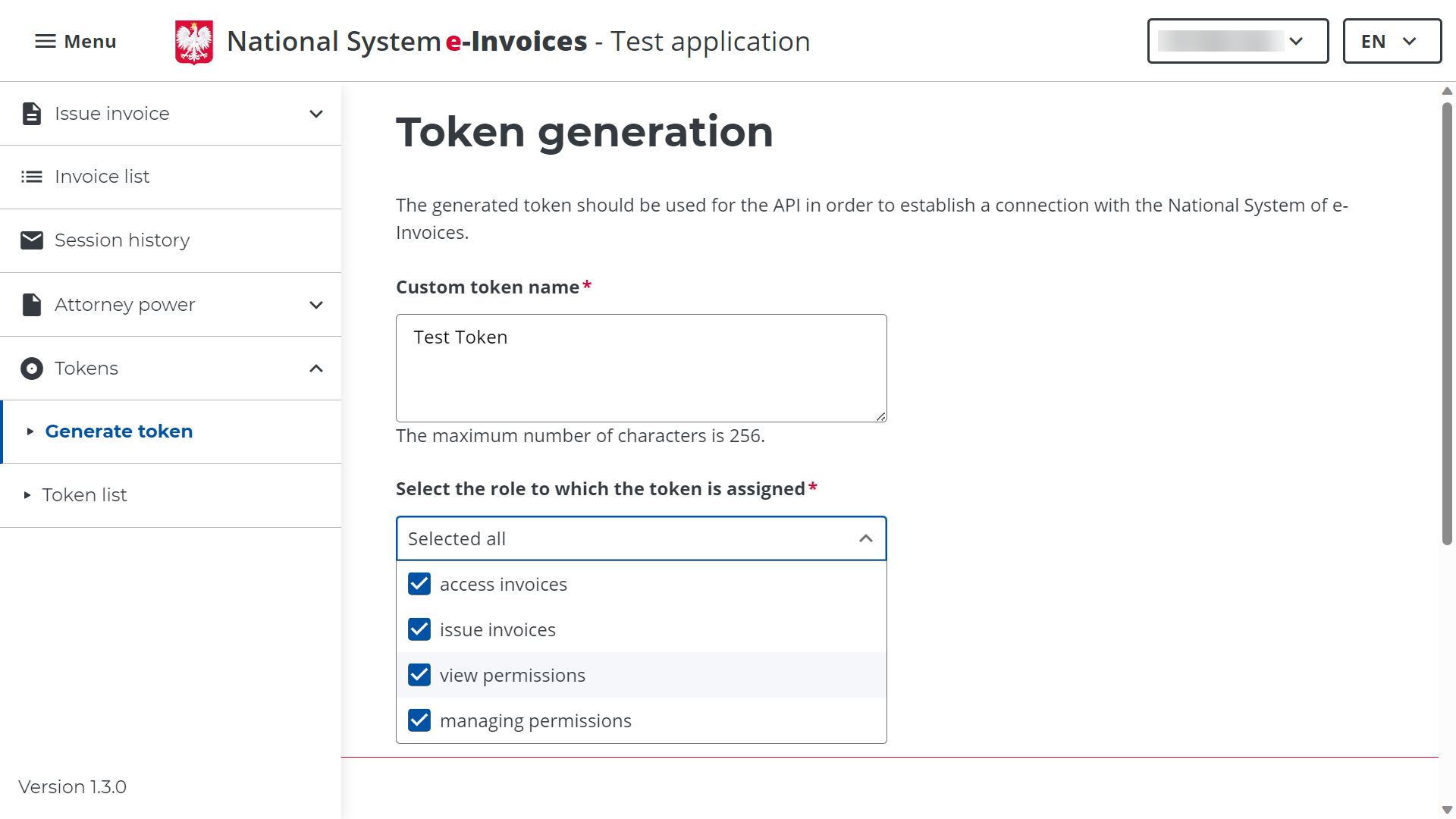
This guide assumes that you have a Company NIP and an account in Poland's National System e-Invoices (KSeF). You require an issuer token for each environment, obtained at the KSeF portal ([Test](https://ksef-test.mf.gov.pl/web/login) | [Production](https://ksef.mf.gov.pl/web/login)).
 ## Setup
1. Navigate to **Configuration** → **Apps**
2. Locate **KSeF Poland** in the app discovery list
3. Tap **Connect** to activate
## Setup
1. Navigate to **Configuration** → **Apps**
2. Locate **KSeF Poland** in the app discovery list
3. Tap **Connect** to activate
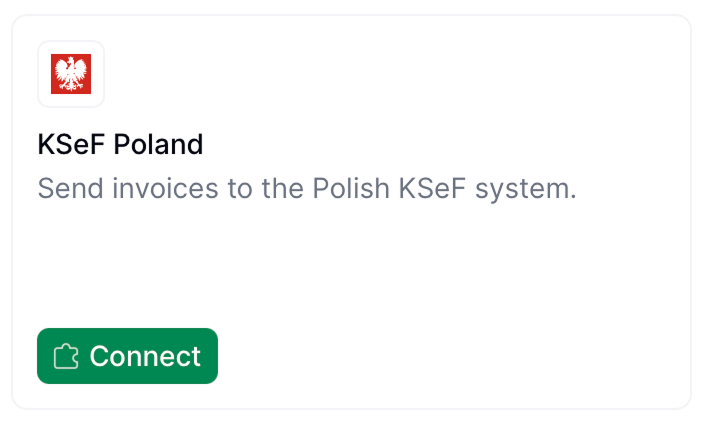 The initial connection requires no configuration for sending invoices.
Signs and converts the GOBL document into the FA\_VAT XML format and then sends it to KSeF.
Make sure you configure the **Send to KSeF** step with your Issuer NIP and the Issuer Token generated in the KSeF Portal.
Copy and paste into a new [Empty Invoice workflow](https://console.invopop.com/redirect/workflows/new?template=empty-invoice) code view.
```json Example KSeF send invoice workflow with states theme={"system"}
{
"name": "PL – Send invoice to KSeF",
"description": "Send FA_VAT invoice to KSeF in Poland",
"schema": "bill/invoice",
"steps": [
{
"id": "7be51070-46e5-11f0-8992-b3700a7ae767",
"name": "Set State",
"provider": "silo.state",
"summary": "Set state to `processing`{.state .processing}",
"config": {
"state": "processing"
}
},
{
"id": "f63048e0-46e5-11f0-8992-b3700a7ae767",
"name": "Add Sequential Code",
"provider": "sequence.enumerate",
"summary": "Dynamic · KSef Sequence · 000001",
"config": {
"name": "KSef Sequence",
"padding": 6,
"sign": false,
"start": 1
}
},
{
"id": "fe680390-46e5-11f0-8992-b3700a7ae767",
"name": "Sign Envelope",
"provider": "silo.close"
},
{
"id": "774dd510-46e5-11f0-8992-b3700a7ae767",
"name": "Send to KSeF (Poland)",
"provider": "ksef-pl.send",
"summary": "Test",
"config": {
"environment": "test",
"issuer_nip": "",
"issuer_token": ""
}
},
{
"id": "79757000-46e5-11f0-8992-b3700a7ae767",
"name": "Generate PDF",
"provider": "pdf",
"summary": "Polish - A4",
"config": {
"date_format": "%Y-%m-%d",
"layout": "A4",
"locale": "pl",
"logo_height": 40
}
},
{
"id": "821a1d50-46e5-11f0-8992-b3700a7ae767",
"name": "Set State",
"provider": "silo.state",
"summary": "Set state to `sent`{.state .sent}",
"config": {
"state": "sent"
}
}
],
"rescue": [
{
"id": "86a794b0-46e5-11f0-8992-b3700a7ae767",
"name": "Set State",
"provider": "silo.state",
"summary": "Set state to `error`{.state .error}",
"config": {
"state": "error"
}
}
]
}
```
Before starting, review the [workflows guide](/guides/features/workflows) to understand the general setup process.
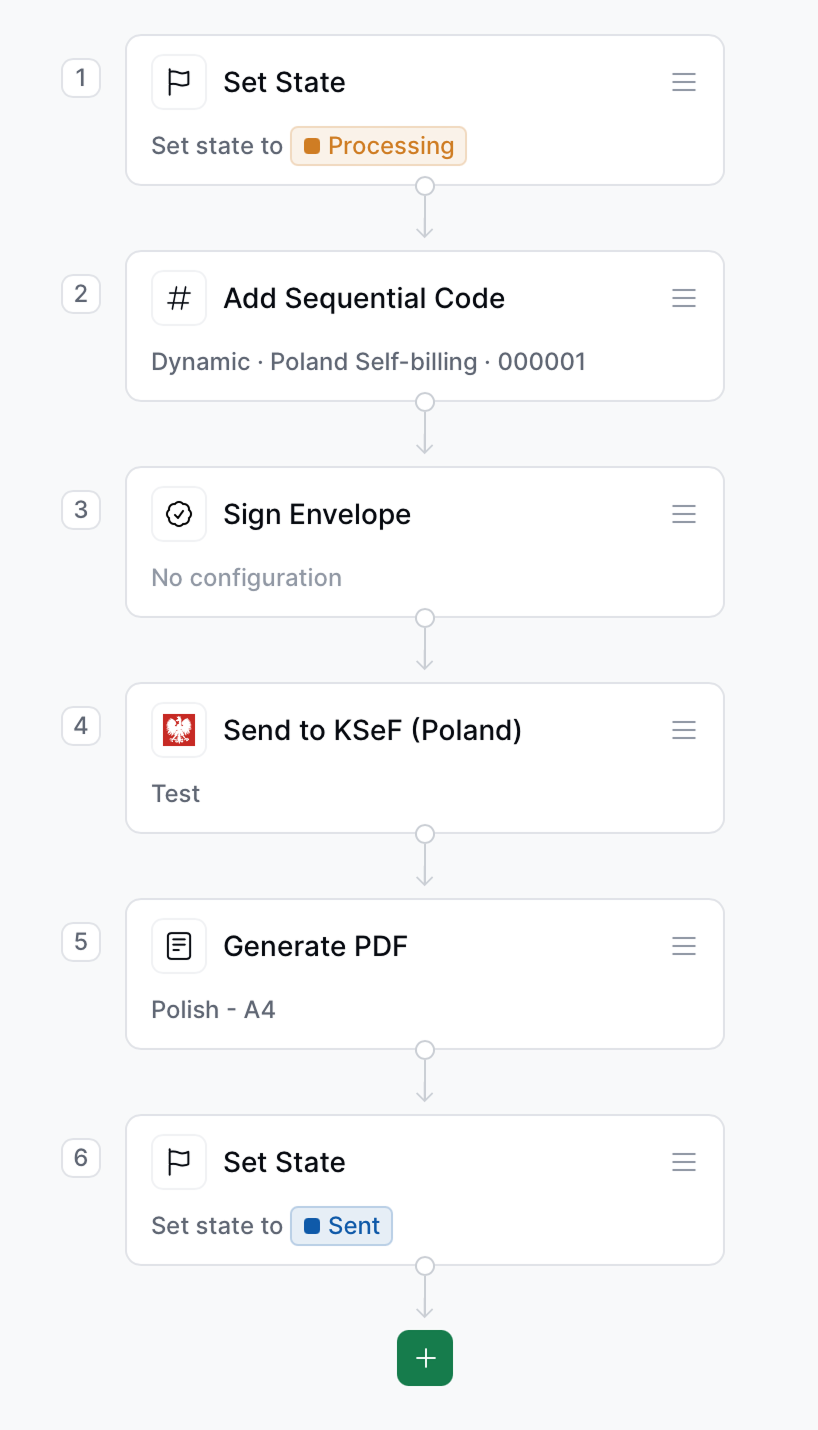
In [Console](https://console.invopop.com), create a new workflow and choose [Empty Invoice workflow](https://console.invopop.com/redirect/workflows/new?template=empty-invoice) as the base. Then add the following steps:
1. **Set State** - To "Processing".
2. **Add sequential code** - Add the desired sequence for your invoices.
3. **Sign Envelope** - Signs the GOBL document preventing further modifications.
4. **Send to KSeF (Poland)** - Generates the FA\_VAT XML and sends it to KSeF.
5. **Generate PDF** - Generates a PDF with a FA\_VAT QR code linked to the KSeF portal.
6. **Set State** - To "Sent".
In the **Error Handling** section, add a **Set State** step with the state set to `"Error"` to capture and flag failed imports.
This is the minimal workflow with state handling required to automate the issuing FA\_VAT invoices through KSeF.
The initial connection requires no configuration for sending invoices.
Signs and converts the GOBL document into the FA\_VAT XML format and then sends it to KSeF.
Make sure you configure the **Send to KSeF** step with your Issuer NIP and the Issuer Token generated in the KSeF Portal.
Copy and paste into a new [Empty Invoice workflow](https://console.invopop.com/redirect/workflows/new?template=empty-invoice) code view.
```json Example KSeF send invoice workflow with states theme={"system"}
{
"name": "PL – Send invoice to KSeF",
"description": "Send FA_VAT invoice to KSeF in Poland",
"schema": "bill/invoice",
"steps": [
{
"id": "7be51070-46e5-11f0-8992-b3700a7ae767",
"name": "Set State",
"provider": "silo.state",
"summary": "Set state to `processing`{.state .processing}",
"config": {
"state": "processing"
}
},
{
"id": "f63048e0-46e5-11f0-8992-b3700a7ae767",
"name": "Add Sequential Code",
"provider": "sequence.enumerate",
"summary": "Dynamic · KSef Sequence · 000001",
"config": {
"name": "KSef Sequence",
"padding": 6,
"sign": false,
"start": 1
}
},
{
"id": "fe680390-46e5-11f0-8992-b3700a7ae767",
"name": "Sign Envelope",
"provider": "silo.close"
},
{
"id": "774dd510-46e5-11f0-8992-b3700a7ae767",
"name": "Send to KSeF (Poland)",
"provider": "ksef-pl.send",
"summary": "Test",
"config": {
"environment": "test",
"issuer_nip": "",
"issuer_token": ""
}
},
{
"id": "79757000-46e5-11f0-8992-b3700a7ae767",
"name": "Generate PDF",
"provider": "pdf",
"summary": "Polish - A4",
"config": {
"date_format": "%Y-%m-%d",
"layout": "A4",
"locale": "pl",
"logo_height": 40
}
},
{
"id": "821a1d50-46e5-11f0-8992-b3700a7ae767",
"name": "Set State",
"provider": "silo.state",
"summary": "Set state to `sent`{.state .sent}",
"config": {
"state": "sent"
}
}
],
"rescue": [
{
"id": "86a794b0-46e5-11f0-8992-b3700a7ae767",
"name": "Set State",
"provider": "silo.state",
"summary": "Set state to `error`{.state .error}",
"config": {
"state": "error"
}
}
]
}
```
Before starting, review the [workflows guide](/guides/features/workflows) to understand the general setup process.
In [Console](https://console.invopop.com), create a new workflow and choose [Empty Invoice workflow](https://console.invopop.com/redirect/workflows/new?template=empty-invoice) as the base. Then add the following steps:
1. **Set State** - To "Processing".
2. **Add sequential code** - Add the desired sequence for your invoices.
3. **Sign Envelope** - Signs the GOBL document preventing further modifications.
4. **Send to KSeF (Poland)** - Generates the FA\_VAT XML and sends it to KSeF.
5. **Generate PDF** - Generates a PDF with a FA\_VAT QR code linked to the KSeF portal.
6. **Set State** - To "Sent".
In the **Error Handling** section, add a **Set State** step with the state set to `"Error"` to capture and flag failed imports.
This is the minimal workflow with state handling required to automate the issuing FA\_VAT invoices through KSeF.
 ### Send an Invoice
The following examples are of partial GOBL documents you can copy and paste directly into the [Invopop Console](https://console.invopop.com) or store via the API as silo entries.
GOBL Invoices sent to KSeF require the following properties in order to perform the correct normalization and validation steps. Invopop will try to assign these automatically, but we recommend defining them explicitly before upload:
* `$regime` to be set to [`PL`](https://docs.gobl.org/regimes/pl)
```json KSeF self-billed invoice expandable theme={"system"}
{
"$schema": "https://gobl.org/draft-0/bill/invoice",
"$regime": "PL",
"$tags": [
"self-billed"
],
"uuid": "3aea7b56-59d8-4beb-90bd-f8f280d852a0",
"type": "standard",
"code": "SAMPLE-001",
"issue_date": "2025-08-01",
"currency": "PLN",
"supplier": {
"name": "Provide One S.L.",
"tax_id": {
"country": "PL",
"code": "9876543210"
},
"addresses": [
{
"num": "42",
"street": "ul. Przykładowa",
"locality": "Warszawa",
"region": "mazowieckie",
"code": "00-015",
"country": "PL"
}
],
"emails": [
{
"addr": "billing@example.com"
}
]
},
"customer": {
"name": "Your Company S.A.",
"tax_id": {
"country": "PL",
"code": "1234567788"
},
"addresses": [
{
"num": "43",
"street": "ul. Przykładowa",
"locality": "Warszawa",
"region": "mazowieckie",
"code": "00-015",
"country": "PL"
}
]
},
"lines": [
{
"i": 1,
"quantity": "20",
"item": {
"name": "Development services",
"price": "90.00",
"unit": "h"
},
"sum": "1800.00",
"taxes": [
{
"cat": "VAT",
"rate": "standard",
"percent": "23.0%"
}
],
"total": "1800.00"
},
{
"i": 2,
"quantity": "1",
"item": {
"name": "Financial service",
"price": "10.00",
"unit": "service"
},
"sum": "10.00",
"taxes": [
{
"cat": "VAT",
"rate": "reduced",
"percent": "8.0%"
}
],
"total": "10.00"
}
]
}
```
## FAQ
Please contact the [Invopop support team](mailto:support@invopop.com) if you have any questions that are not listed here.
We currently support Standard Invoices (VAT) and Credit Notes (KOR). We add support for more types as required by our customers.
In special cases we facilitate test NIPs and tokens to our clients. Get in touch with the [support team](mailto:support@invopop.com) if you require credentials for testing.
### Send an Invoice
The following examples are of partial GOBL documents you can copy and paste directly into the [Invopop Console](https://console.invopop.com) or store via the API as silo entries.
GOBL Invoices sent to KSeF require the following properties in order to perform the correct normalization and validation steps. Invopop will try to assign these automatically, but we recommend defining them explicitly before upload:
* `$regime` to be set to [`PL`](https://docs.gobl.org/regimes/pl)
```json KSeF self-billed invoice expandable theme={"system"}
{
"$schema": "https://gobl.org/draft-0/bill/invoice",
"$regime": "PL",
"$tags": [
"self-billed"
],
"uuid": "3aea7b56-59d8-4beb-90bd-f8f280d852a0",
"type": "standard",
"code": "SAMPLE-001",
"issue_date": "2025-08-01",
"currency": "PLN",
"supplier": {
"name": "Provide One S.L.",
"tax_id": {
"country": "PL",
"code": "9876543210"
},
"addresses": [
{
"num": "42",
"street": "ul. Przykładowa",
"locality": "Warszawa",
"region": "mazowieckie",
"code": "00-015",
"country": "PL"
}
],
"emails": [
{
"addr": "billing@example.com"
}
]
},
"customer": {
"name": "Your Company S.A.",
"tax_id": {
"country": "PL",
"code": "1234567788"
},
"addresses": [
{
"num": "43",
"street": "ul. Przykładowa",
"locality": "Warszawa",
"region": "mazowieckie",
"code": "00-015",
"country": "PL"
}
]
},
"lines": [
{
"i": 1,
"quantity": "20",
"item": {
"name": "Development services",
"price": "90.00",
"unit": "h"
},
"sum": "1800.00",
"taxes": [
{
"cat": "VAT",
"rate": "standard",
"percent": "23.0%"
}
],
"total": "1800.00"
},
{
"i": 2,
"quantity": "1",
"item": {
"name": "Financial service",
"price": "10.00",
"unit": "service"
},
"sum": "10.00",
"taxes": [
{
"cat": "VAT",
"rate": "reduced",
"percent": "8.0%"
}
],
"total": "10.00"
}
]
}
```
## FAQ
Please contact the [Invopop support team](mailto:support@invopop.com) if you have any questions that are not listed here.
We currently support Standard Invoices (VAT) and Credit Notes (KOR). We add support for more types as required by our customers.
In special cases we facilitate test NIPs and tokens to our clients. Get in touch with the [support team](mailto:support@invopop.com) if you require credentials for testing.