> ## Documentation Index
> Fetch the complete documentation index at: https://invopop-singapore.mintlify.site/llms.txt
> Use this file to discover all available pages before exploring further.
# VERI*FACTU Invoicing Guide
> Issue invoices in Spain with VERI*FACTU.
## Introduction
The Spanish Tax Agency (AEAT) is still finalizing VERI\*FACTU’s technical and legal requirements. Invopop’s implementation may change accordingly.
VERI\*FACTU is is a fiscal initiative by the Spanish Tax Agency (AEAT) that requires businesses to report invoices through certified software. The system generates unique identifiers for each invoice and creates digitally signed XML files that are submitted to the tax authorities.
VERI\*FACTU will be mandatory for companies from January 1st, 2026. The rest of tax payers from 1 July 2026. Companies reporting with SII or TicketBAI are exempt from reporting with VERI\*FACTU.
## Prerequisites
To issue your first VERI\*FACTU invoice, you must have had registered at least one supplier. Make sure you read and implemented the [VERI\*FACTU supplier registration guide](/guides/countries/es-verifactu-supplier) before continuing with this guide.
## Setup
Add a new workflow to your workspace for issuing invoices. You can start with the template below.
This workflow will issue an invoice through VERI\*FACTU.
Copy and paste into a new [Empty Invoice workflow](https://console.invopop.com/redirect/workflows/new?template=empty-invoice) code view.
```json Example VERI*FACTU invoice workflow with states theme={"system"}
{
"name": "VERI*FACTU issue invoice",
"description": "Generate and send VERI*FACTU to AEAT, then generate PDF with QR",
"schema": "bill/invoice",
"steps": [
{
"id": "59f4dee0-bc8f-11ef-8ca1-573cbe7db4cd",
"name": "Set State",
"provider": "silo.state",
"summary": "Set state to `processing`{.state .processing}",
"config": {
"state": "processing"
}
},
{
"id": "ec41cce0-0fc3-11f0-8a81-7911b3ecee3c",
"name": "Add Sequential Code",
"provider": "sequence.enumerate",
"summary": "Dynamic · Verifactu · 000001",
"config": {
"name": "Verifactu",
"padding": 6,
"start": 1
}
},
{
"id": "fc75e4f0-8721-11ef-a962-73e3f2037a52",
"name": "Sign Envelope",
"provider": "silo.close"
},
{
"id": "ef2ce710-bc8e-11ef-8ca1-573cbe7db4cd",
"name": "Generate XML",
"provider": "verifactu.generate"
},
{
"id": "61661540-bc8f-11ef-8ca1-573cbe7db4cd",
"name": "Issue invoice",
"provider": "verifactu.send"
},
{
"id": "65312700-bc8f-11ef-8ca1-573cbe7db4cd",
"name": "Generate PDF",
"provider": "pdf",
"summary": "Spanish - A4",
"config": {
"date_format": "%Y-%m-%d",
"layout": "A4",
"locale": "es",
"logo_height": 60
}
},
{
"id": "6abb4de0-bc8f-11ef-8ca1-573cbe7db4cd",
"name": "Set State",
"provider": "silo.state",
"summary": "Set state to `sent`{.state .sent}",
"config": {
"state": "sent"
}
}
],
"rescue": [
{
"id": "798b1d00-bc8f-11ef-8ca1-573cbe7db4cd",
"name": "Set State",
"provider": "silo.state",
"summary": "Set state to `error`{.state .error}",
"config": {
"state": "error"
}
}
]
}
```
In [Console](https://console.invopop.com) create a new workflow and select [Empty Invoice workflow](https://console.invopop.com/redirect/workflows/new?template=empty-invoice) in the template selector, then add the following steps:
1. **Sign Envelope** - Signs the VERI\*FACTU document.
2. **Generate XML** - Creates the XML document and adds it to the chain. View it in the `Files` section.
3. **Issue invoice** - Submits the XML to AEAT and returns the response.
4. **Generate PDF** - Creates the PDF invoice with the required QR code.
In the Error Handling section, add the **Set State** action and select `Error`.
Keep the `Workflow ID` at hand, you'll use it later.
VERI\*FACTU allows for document modifications after submission. If a document is rejected or contains errors, update the GOBL details and resubmit to the same workflow.
## Issue an Invoice
Use the [Create an entry](/api-ref/silo/entries/create-an-entry-put) endpoint to upload the invoice details. Include an [invoice](https://docs.gobl.org/draft-0/bill/invoice) object in the [data](/api-ref/silo/entries/create-an-entry-put#body-data) field with these required fields:
* `regime`: `ES`
* Add the `es-verifactu-v1` addon
* `supplier`: Use the details of the supplier you've registered before.
You can copy one of the example invoices below as a reference.
```json VERI*FACTU B2C Invoice theme={"system"}
{
"$schema": "https://gobl.org/draft-0/bill/invoice",
"$regime": "ES",
"$addons": [
"es-verifactu-v1"
],
"$tags": [
"simplified"
],
"uuid": "3aea7b56-59d8-4beb-90bd-f8f280d852a0",
"type": "standard",
"series": "SAMPLE",
"code": "004",
"issue_date": "2024-11-13",
"currency": "EUR",
"tax": {
"ext": {
"es-verifactu-doc-type": "F2"
}
},
"supplier": {
"name": "Invopop S.L.",
"tax_id": {
"country": "ES",
"code": "B85905495"
},
"addresses": [
{
"num": "42",
"street": "Calle Pradillo",
"locality": "Madrid",
"region": "Madrid",
"code": "28002",
"country": "ES"
}
],
"emails": [
{
"addr": "billing@example.com"
}
]
},
"lines": [
{
"i": 1,
"quantity": "20",
"item": {
"name": "Development services",
"price": "90.00",
"unit": "h"
},
"sum": "1800.00",
"taxes": [
{
"cat": "VAT",
"rate": "standard",
"percent": "21.0%",
"ext": {
"es-verifactu-op-class": "S1",
"es-verifactu-regime": "01"
}
}
],
"total": "1800.00"
}
],
"totals": {
"sum": "1800.00",
"total": "1800.00",
"taxes": {
"categories": [
{
"code": "VAT",
"rates": [
{
"key": "standard",
"ext": {
"es-verifactu-op-class": "S1",
"es-verifactu-regime": "01"
},
"base": "1800.00",
"percent": "21.0%",
"amount": "378.00"
}
],
"amount": "378.00"
}
],
"sum": "378.00"
},
"tax": "378.00",
"total_with_tax": "2178.00",
"payable": "2178.00"
},
"notes": [
{
"key": "general",
"text": "This is a sample invoice with a standard tax"
}
]
}
```
```json VERI*FACTU B2B Invoice theme={"system"}
{
"$schema": "https://gobl.org/draft-0/bill/invoice",
"$regime": "ES",
"$addons": [
"es-verifactu-v1"
],
"uuid": "3aea7b56-59d8-4beb-90bd-f8f280d852a0",
"type": "standard",
"series": "SAMPLE",
"code": "004",
"issue_date": "2024-11-13",
"currency": "EUR",
"tax": {
"ext": {
"es-verifactu-doc-type": "F1"
}
},
"supplier": {
"name": "Invopop S.L.",
"tax_id": {
"country": "ES",
"code": "B85905495"
},
"addresses": [
{
"num": "42",
"street": "Calle Pradillo",
"locality": "Madrid",
"region": "Madrid",
"code": "28002",
"country": "ES"
}
],
"emails": [
{
"addr": "billing@example.com"
}
]
},
"customer": {
"name": "Sample Consumer",
"tax_id": {
"country": "ES",
"code": "B63272603"
}
},
"lines": [
{
"i": 1,
"quantity": "20",
"item": {
"name": "Development services",
"price": "90.00",
"unit": "h"
},
"sum": "1800.00",
"taxes": [
{
"cat": "VAT",
"rate": "standard",
"percent": "21.0%",
"ext": {
"es-verifactu-op-class": "S1",
"es-verifactu-regime": "01"
}
}
],
"total": "1800.00"
}
],
"totals": {
"sum": "1800.00",
"total": "1800.00",
"taxes": {
"categories": [
{
"code": "VAT",
"rates": [
{
"key": "standard",
"ext": {
"es-verifactu-op-class": "S1",
"es-verifactu-regime": "01"
},
"base": "1800.00",
"percent": "21.0%",
"amount": "378.00"
}
],
"amount": "378.00"
}
],
"sum": "378.00"
},
"tax": "378.00",
"total_with_tax": "2178.00",
"payable": "2178.00"
},
"notes": [
{
"key": "general",
"text": "This is a sample invoice with a standard tax"
}
]
}
```
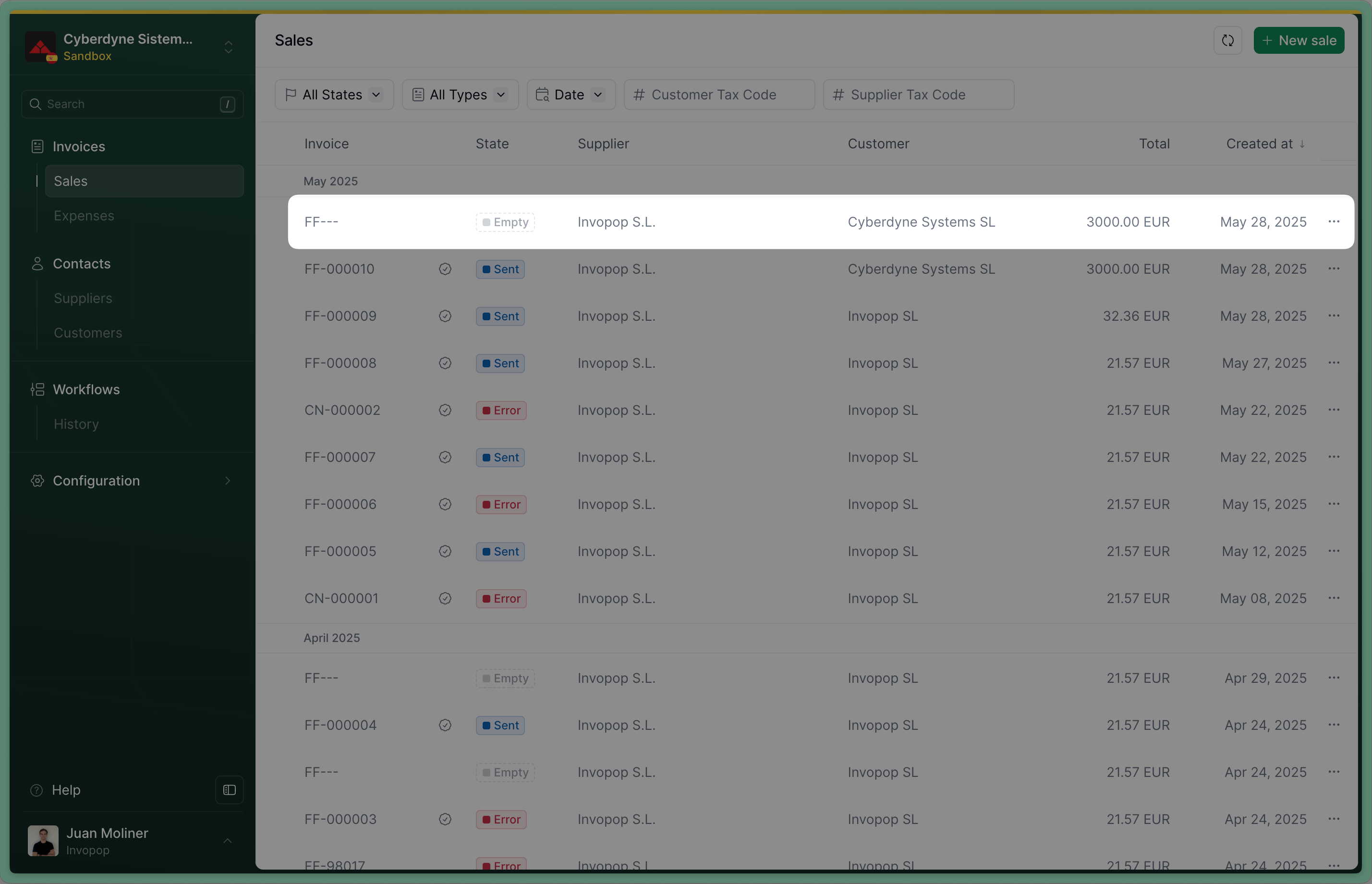
After uploading you'll see the document in the **Invoices** section with status `Empty`.
 Send the invoice to the VERI\*FACTU workflow using the [Create a job](/api-ref/transform/jobs/create-a-job-post) endpoint. Use:
* `workflow_id`: use the Workflow ID of the \_VERI\*FACTU invoice: workflow we created during setup
* `silo_entry_id`: use the Silo Entry ID of the invoice you've just uploaded.
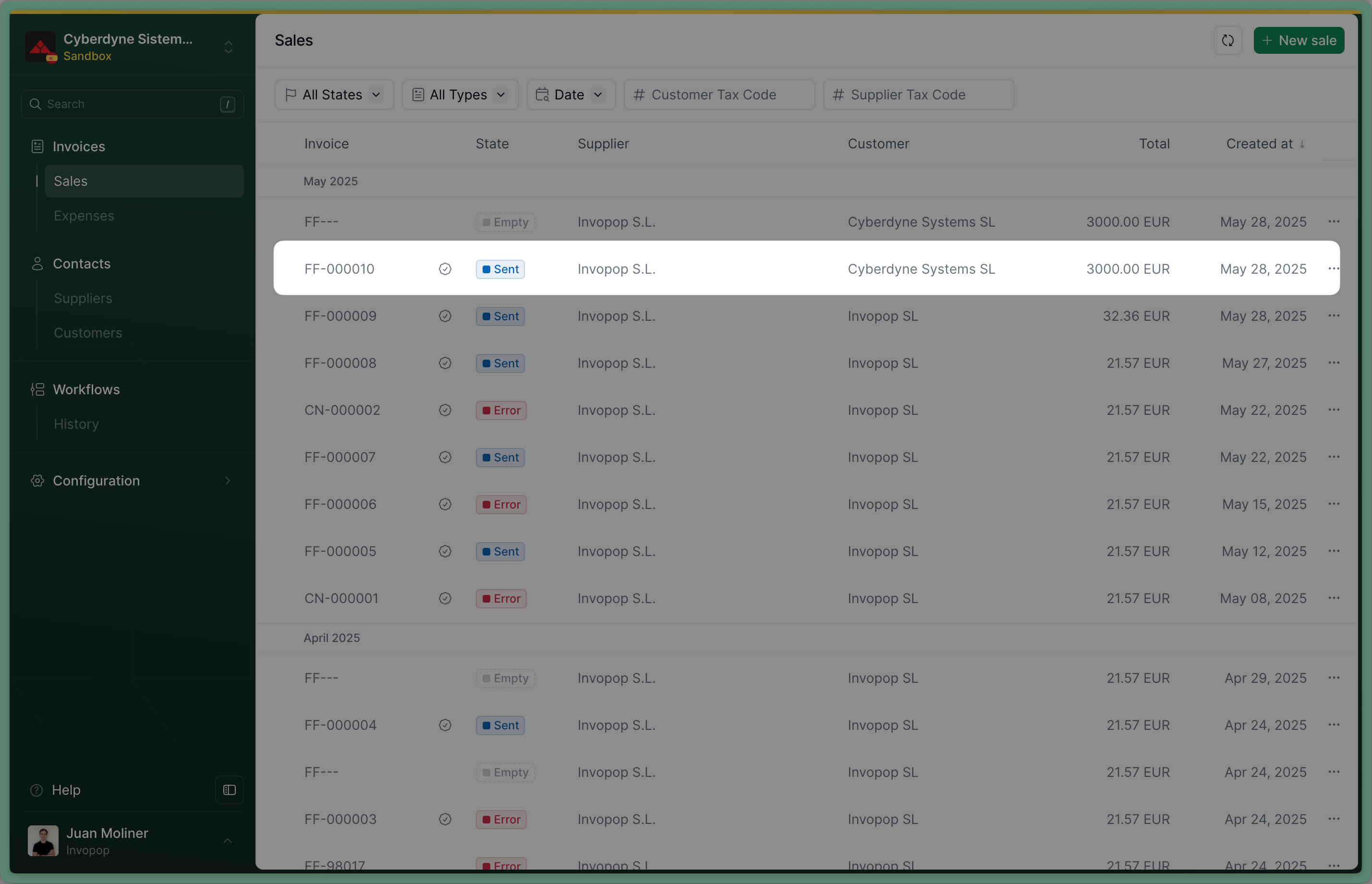
The invoice's status will change to `Sent` when the workflow completes successfully.
Send the invoice to the VERI\*FACTU workflow using the [Create a job](/api-ref/transform/jobs/create-a-job-post) endpoint. Use:
* `workflow_id`: use the Workflow ID of the \_VERI\*FACTU invoice: workflow we created during setup
* `silo_entry_id`: use the Silo Entry ID of the invoice you've just uploaded.
The invoice's status will change to `Sent` when the workflow completes successfully.
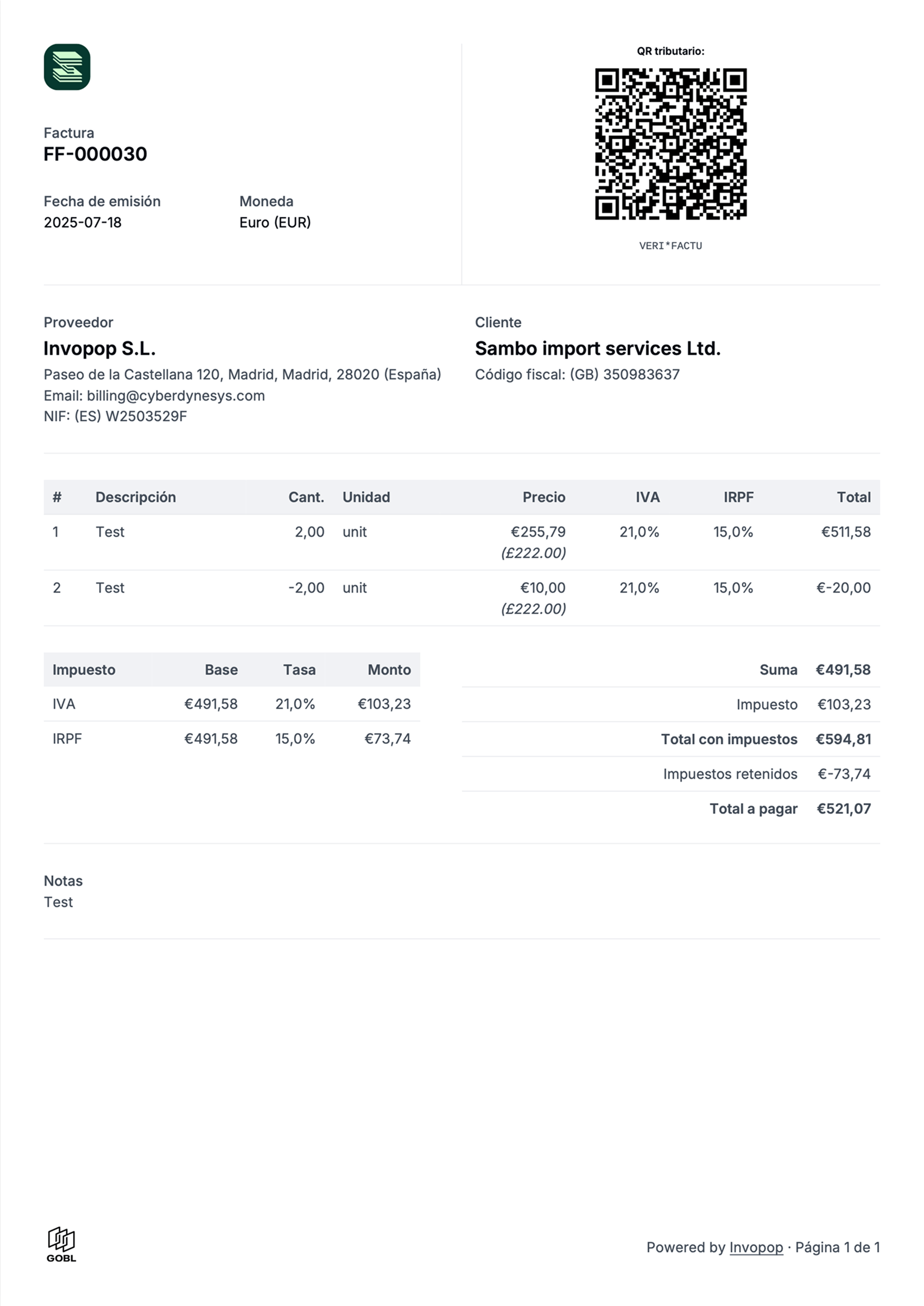
 You can verify that the PDF was generated by clicking on the invoice and selecting the PDF from the "Files" tab.
 ## Issue a Credit Note (Rectificativa por Diferencias)
In Spain, one way to correct an invoice is by issuing a credit note, known as a *Rectificativa por Diferencias*.
An alternative method is to issue a *Rectificativa por Sustitución*, which involves creating a new invoice with the type corrective.
The difference between the two is subtle but important:
* A credit note adjusts the value of the original invoice.
* A corrective invoice replaces the original invoice entirely.
For example, if you issued an invoice for €100 but later realized it should have been €80, you can either:
* Issue a credit note for €20, or
* Issue a corrective invoice for €80.
Unless you have a specific requirement to use a corrective invoice we recommend only using credit notes. They're more widely supported across countries, while corrective invoices are specific to a few jurisdictions like Spain.
A credit note in Invopop is an invoice of the type credit note. So the process is very similar to uploading an invoice. Use the [Create an entry](/api-ref/silo/entries/create-an-entry-put) endpoint to upload a credit note. Include an [invoice](https://docs.gobl.org/draft-0/bill/invoice) object in the [data](/api-ref/silo/entries/create-an-entry-put#body-data), with these required fields:
* `regime`: `ES`
* Add the `es-verifactu-v1` addon
* `supplier`: use the same supplier details as in the original invoice
* `type`: `credit-note`
* `preceding`: references the original invoice, within it, you must include:
* `uuid`: the UUID of the original invoice (optional but recommended)
* `type`: type of the original invoice
* `issue_date`: the date of the original invoice
* `series`: the series of the original invoice
* `code`: the code of the original invoice
You can copy one of the example credit notes below as a reference.
```json VERI*FACTU Credit Note theme={"system"}
{
"$schema": "https://gobl.org/draft-0/bill/invoice",
"$regime": "ES",
"$addons": [
"es-verifactu-v1"
],
"uuid": "01971bb1-1499-7001-81ea-26f51cf396e1",
"type": "credit-note",
"series": "CN",
"issue_date": "2025-05-29",
"currency": "EUR",
"preceding": [
{
"uuid": "3aea7b56-59d8-4beb-90bd-f8f280d852a0",
"type": "standard",
"issue_date": "2024-11-13",
"series": "SAMPLE",
"code": "004"
}
],
"tax": {
"ext": {
"es-verifactu-correction-type": "I",
"es-verifactu-doc-type": "R1"
}
},
"supplier": {
"name": "Invopop S.L.",
"tax_id": {
"country": "ES",
"code": "B85905495"
},
"addresses": [
{
"num": "42",
"street": "Calle Pradillo",
"locality": "Madrid",
"region": "Madrid",
"code": "28002",
"country": "ES"
}
],
"emails": [
{
"addr": "billing@example.com"
}
]
},
"customer": {
"name": "Sample Consumer",
"tax_id": {
"country": "ES",
"code": "B63272603"
}
},
"lines": [
{
"i": 1,
"quantity": "20",
"item": {
"name": "Development services",
"price": "90.00",
"unit": "h"
},
"sum": "1800.00",
"taxes": [
{
"cat": "VAT",
"rate": "standard",
"percent": "21.0%",
"ext": {
"es-verifactu-op-class": "S1",
"es-verifactu-regime": "01"
}
}
],
"total": "1800.00"
}
],
"totals": {
"sum": "1800.00",
"total": "1800.00",
"taxes": {
"categories": [
{
"code": "VAT",
"rates": [
{
"key": "standard",
"ext": {
"es-verifactu-op-class": "S1",
"es-verifactu-regime": "01"
},
"base": "1800.00",
"percent": "21.0%",
"amount": "378.00"
}
],
"amount": "378.00"
}
],
"sum": "378.00"
},
"tax": "378.00",
"total_with_tax": "2178.00",
"payable": "2178.00"
},
"notes": [
{
"key": "general",
"text": "This is a sample invoice with a standard tax"
}
]
}
```
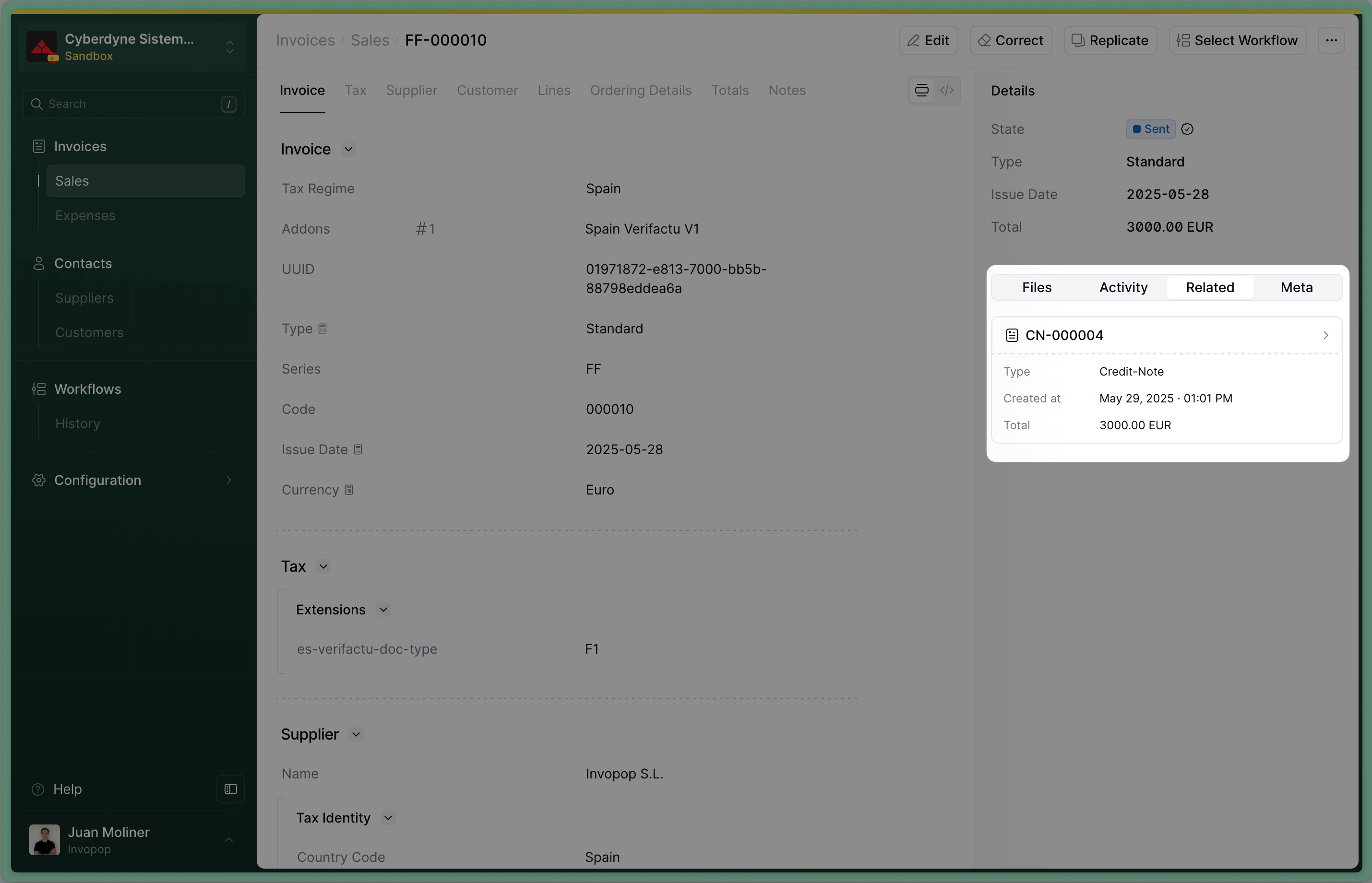
After successful upload, you'll see the credit note in the **Invoices** section with status `Empty`. If you've included the `uuid` of the invoice in preceding, you'll see a link to the credit note we've just created in the *Related* tab of the invoice.
## Issue a Credit Note (Rectificativa por Diferencias)
In Spain, one way to correct an invoice is by issuing a credit note, known as a *Rectificativa por Diferencias*.
An alternative method is to issue a *Rectificativa por Sustitución*, which involves creating a new invoice with the type corrective.
The difference between the two is subtle but important:
* A credit note adjusts the value of the original invoice.
* A corrective invoice replaces the original invoice entirely.
For example, if you issued an invoice for €100 but later realized it should have been €80, you can either:
* Issue a credit note for €20, or
* Issue a corrective invoice for €80.
Unless you have a specific requirement to use a corrective invoice we recommend only using credit notes. They're more widely supported across countries, while corrective invoices are specific to a few jurisdictions like Spain.
A credit note in Invopop is an invoice of the type credit note. So the process is very similar to uploading an invoice. Use the [Create an entry](/api-ref/silo/entries/create-an-entry-put) endpoint to upload a credit note. Include an [invoice](https://docs.gobl.org/draft-0/bill/invoice) object in the [data](/api-ref/silo/entries/create-an-entry-put#body-data), with these required fields:
* `regime`: `ES`
* Add the `es-verifactu-v1` addon
* `supplier`: use the same supplier details as in the original invoice
* `type`: `credit-note`
* `preceding`: references the original invoice, within it, you must include:
* `uuid`: the UUID of the original invoice (optional but recommended)
* `type`: type of the original invoice
* `issue_date`: the date of the original invoice
* `series`: the series of the original invoice
* `code`: the code of the original invoice
You can copy one of the example credit notes below as a reference.
```json VERI*FACTU Credit Note theme={"system"}
{
"$schema": "https://gobl.org/draft-0/bill/invoice",
"$regime": "ES",
"$addons": [
"es-verifactu-v1"
],
"uuid": "01971bb1-1499-7001-81ea-26f51cf396e1",
"type": "credit-note",
"series": "CN",
"issue_date": "2025-05-29",
"currency": "EUR",
"preceding": [
{
"uuid": "3aea7b56-59d8-4beb-90bd-f8f280d852a0",
"type": "standard",
"issue_date": "2024-11-13",
"series": "SAMPLE",
"code": "004"
}
],
"tax": {
"ext": {
"es-verifactu-correction-type": "I",
"es-verifactu-doc-type": "R1"
}
},
"supplier": {
"name": "Invopop S.L.",
"tax_id": {
"country": "ES",
"code": "B85905495"
},
"addresses": [
{
"num": "42",
"street": "Calle Pradillo",
"locality": "Madrid",
"region": "Madrid",
"code": "28002",
"country": "ES"
}
],
"emails": [
{
"addr": "billing@example.com"
}
]
},
"customer": {
"name": "Sample Consumer",
"tax_id": {
"country": "ES",
"code": "B63272603"
}
},
"lines": [
{
"i": 1,
"quantity": "20",
"item": {
"name": "Development services",
"price": "90.00",
"unit": "h"
},
"sum": "1800.00",
"taxes": [
{
"cat": "VAT",
"rate": "standard",
"percent": "21.0%",
"ext": {
"es-verifactu-op-class": "S1",
"es-verifactu-regime": "01"
}
}
],
"total": "1800.00"
}
],
"totals": {
"sum": "1800.00",
"total": "1800.00",
"taxes": {
"categories": [
{
"code": "VAT",
"rates": [
{
"key": "standard",
"ext": {
"es-verifactu-op-class": "S1",
"es-verifactu-regime": "01"
},
"base": "1800.00",
"percent": "21.0%",
"amount": "378.00"
}
],
"amount": "378.00"
}
],
"sum": "378.00"
},
"tax": "378.00",
"total_with_tax": "2178.00",
"payable": "2178.00"
},
"notes": [
{
"key": "general",
"text": "This is a sample invoice with a standard tax"
}
]
}
```
After successful upload, you'll see the credit note in the **Invoices** section with status `Empty`. If you've included the `uuid` of the invoice in preceding, you'll see a link to the credit note we've just created in the *Related* tab of the invoice.
 Send the credit note to the VERI\*FACTU workflow using the [Create a job](/api-ref/transform/jobs/create-a-job-post) endpoint. Use:
* `workflow_id`: use the Workflow ID of the \_VERI\*FACTU invoice \_workflow we created during setup
* `silo_entry_id`: use the The Silo Entry ID of the credit note you've just uploaded.
The credit note's status will change to `Sent` when the workflow completes successfully.
## Issue a Corrective Invoice (Rectificativa por Sustitución)
A corrective invoice in Invopop is an invoice of the type `corrective`. So the process is very similar to uploading an invoice. Use the [Create an entry](/api-ref/silo/entries/create-an-entry-put) endpoint to upload a corrective invoice. Include an [invoice](https://docs.gobl.org/draft-0/bill/invoice) object in the [data](/api-ref/silo/entries/create-an-entry-put#body-data), with these required fields:
* `regime`: `ES`
* Add the `es-verifactu-v1` addon
* `supplier_id`: use the same supplier details as in the original invoice
* `type`: `corrective`
* `preceding`: references the original invoice, within it, you must include:
* `uuid`: the UUID of the original invoice (optional but recommended)
* `type`: type of the original invoice
* `issue_date`: the date of the original invoice
* `series`: the series of the original invoice
* `code`: the code of the original invoice
* `tax`: the tax section of the original invoice, you can copy it from the original invoice
You can copy one of the example corrective invoices below as a reference.
```json VERI*FACTU Corrective Invoice theme={"system"}
{
"$schema": "https://gobl.org/draft-0/bill/invoice",
"$regime": "ES",
"$addons": [
"es-verifactu-v1"
],
"uuid": "01971bcb-dd09-7001-b5c0-95e72f3f1a8c",
"type": "corrective",
"series": "CO",
"issue_date": "2025-05-29",
"currency": "EUR",
"preceding": [
{
"uuid": "3aea7b56-59d8-4beb-90bd-f8f280d852a0",
"type": "standard",
"issue_date": "2024-11-13",
"series": "SAMPLE",
"code": "004",
"tax": {
"categories": [
{
"code": "VAT",
"rates": [
{
"key": "standard",
"ext": {
"es-verifactu-op-class": "S1",
"es-verifactu-regime": "01"
},
"base": "1800.00",
"percent": "21.0%",
"amount": "378.00"
}
],
"amount": "378.00"
}
],
"sum": "378.00"
}
}
],
"tax": {
"ext": {
"es-verifactu-correction-type": "S",
"es-verifactu-doc-type": "R1"
}
},
"supplier": {
"name": "Invopop S.L.",
"tax_id": {
"country": "ES",
"code": "B85905495"
},
"addresses": [
{
"num": "42",
"street": "Calle Pradillo",
"locality": "Madrid",
"region": "Madrid",
"code": "28002",
"country": "ES"
}
],
"emails": [
{
"addr": "billing@example.com"
}
]
},
"customer": {
"name": "Sample Consumer",
"tax_id": {
"country": "ES",
"code": "B63272603"
}
},
"lines": [
{
"i": 1,
"quantity": "20",
"item": {
"name": "Development services",
"price": "90.00",
"unit": "h"
},
"sum": "1800.00",
"taxes": [
{
"cat": "VAT",
"rate": "standard",
"percent": "21.0%",
"ext": {
"es-verifactu-op-class": "S1",
"es-verifactu-regime": "01"
}
}
],
"total": "1800.00"
}
],
"totals": {
"sum": "1800.00",
"total": "1800.00",
"taxes": {
"categories": [
{
"code": "VAT",
"rates": [
{
"key": "standard",
"ext": {
"es-verifactu-op-class": "S1",
"es-verifactu-regime": "01"
},
"base": "1800.00",
"percent": "21.0%",
"amount": "378.00"
}
],
"amount": "378.00"
}
],
"sum": "378.00"
},
"tax": "378.00",
"total_with_tax": "2178.00",
"payable": "2178.00"
},
"notes": [
{
"key": "general",
"text": "This is a sample invoice with a standard tax"
}
]
}
```
After successful upload, you'll see the corrective invoice in the **Invoices** section with status `Empty`. If you've included the `uuid` of the invoice in preceding, you'll see a link to the corrective invoice we've just created in the *Related* tab of the invoice.
Send the credit note to the VERI\*FACTU workflow using the [Create a job](/api-ref/transform/jobs/create-a-job-post) endpoint. Use:
* `workflow_id`: use the Workflow ID of the \_VERI\*FACTU invoice \_workflow we created during setup
* `silo_entry_id`: use the The Silo Entry ID of the credit note you've just uploaded.
The credit note's status will change to `Sent` when the workflow completes successfully.
## Issue a Corrective Invoice (Rectificativa por Sustitución)
A corrective invoice in Invopop is an invoice of the type `corrective`. So the process is very similar to uploading an invoice. Use the [Create an entry](/api-ref/silo/entries/create-an-entry-put) endpoint to upload a corrective invoice. Include an [invoice](https://docs.gobl.org/draft-0/bill/invoice) object in the [data](/api-ref/silo/entries/create-an-entry-put#body-data), with these required fields:
* `regime`: `ES`
* Add the `es-verifactu-v1` addon
* `supplier_id`: use the same supplier details as in the original invoice
* `type`: `corrective`
* `preceding`: references the original invoice, within it, you must include:
* `uuid`: the UUID of the original invoice (optional but recommended)
* `type`: type of the original invoice
* `issue_date`: the date of the original invoice
* `series`: the series of the original invoice
* `code`: the code of the original invoice
* `tax`: the tax section of the original invoice, you can copy it from the original invoice
You can copy one of the example corrective invoices below as a reference.
```json VERI*FACTU Corrective Invoice theme={"system"}
{
"$schema": "https://gobl.org/draft-0/bill/invoice",
"$regime": "ES",
"$addons": [
"es-verifactu-v1"
],
"uuid": "01971bcb-dd09-7001-b5c0-95e72f3f1a8c",
"type": "corrective",
"series": "CO",
"issue_date": "2025-05-29",
"currency": "EUR",
"preceding": [
{
"uuid": "3aea7b56-59d8-4beb-90bd-f8f280d852a0",
"type": "standard",
"issue_date": "2024-11-13",
"series": "SAMPLE",
"code": "004",
"tax": {
"categories": [
{
"code": "VAT",
"rates": [
{
"key": "standard",
"ext": {
"es-verifactu-op-class": "S1",
"es-verifactu-regime": "01"
},
"base": "1800.00",
"percent": "21.0%",
"amount": "378.00"
}
],
"amount": "378.00"
}
],
"sum": "378.00"
}
}
],
"tax": {
"ext": {
"es-verifactu-correction-type": "S",
"es-verifactu-doc-type": "R1"
}
},
"supplier": {
"name": "Invopop S.L.",
"tax_id": {
"country": "ES",
"code": "B85905495"
},
"addresses": [
{
"num": "42",
"street": "Calle Pradillo",
"locality": "Madrid",
"region": "Madrid",
"code": "28002",
"country": "ES"
}
],
"emails": [
{
"addr": "billing@example.com"
}
]
},
"customer": {
"name": "Sample Consumer",
"tax_id": {
"country": "ES",
"code": "B63272603"
}
},
"lines": [
{
"i": 1,
"quantity": "20",
"item": {
"name": "Development services",
"price": "90.00",
"unit": "h"
},
"sum": "1800.00",
"taxes": [
{
"cat": "VAT",
"rate": "standard",
"percent": "21.0%",
"ext": {
"es-verifactu-op-class": "S1",
"es-verifactu-regime": "01"
}
}
],
"total": "1800.00"
}
],
"totals": {
"sum": "1800.00",
"total": "1800.00",
"taxes": {
"categories": [
{
"code": "VAT",
"rates": [
{
"key": "standard",
"ext": {
"es-verifactu-op-class": "S1",
"es-verifactu-regime": "01"
},
"base": "1800.00",
"percent": "21.0%",
"amount": "378.00"
}
],
"amount": "378.00"
}
],
"sum": "378.00"
},
"tax": "378.00",
"total_with_tax": "2178.00",
"payable": "2178.00"
},
"notes": [
{
"key": "general",
"text": "This is a sample invoice with a standard tax"
}
]
}
```
After successful upload, you'll see the corrective invoice in the **Invoices** section with status `Empty`. If you've included the `uuid` of the invoice in preceding, you'll see a link to the corrective invoice we've just created in the *Related* tab of the invoice.
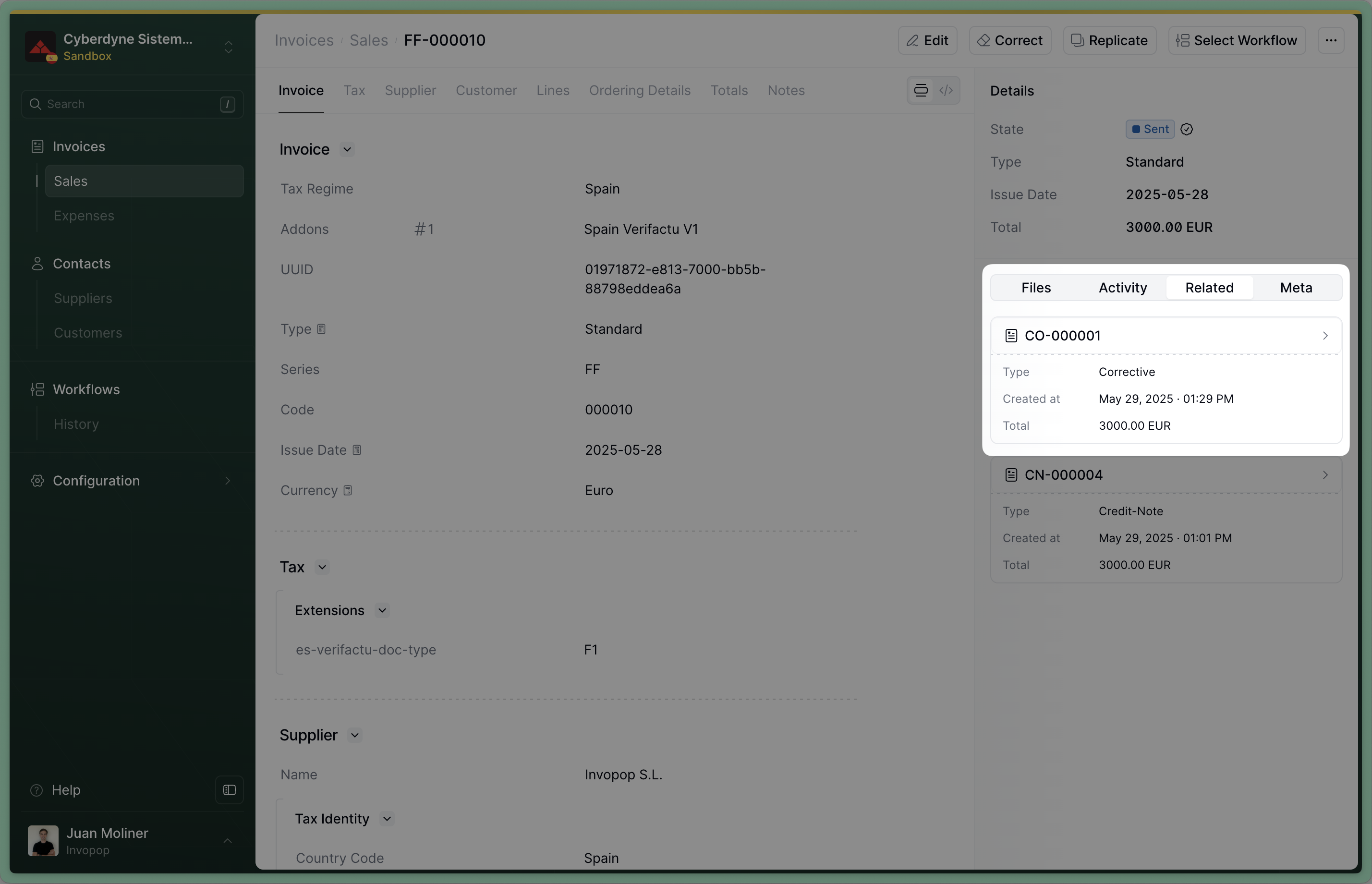 Send the corrective invoice to the VERI\*FACTU workflow using the [Create a job](/api-ref/transform/jobs/create-a-job-post) endpoint. Use:
* `workflow_id`: use the Workflow ID of the *VERI\*FACTU invoice* workflow we created during setup
* `silo_entry_id`: use the The Silo Entry ID of the corrective invoice you've just uploaded.
The corrective invoice's status will change to `Sent` when the workflow completes successfully.
## Cancel an Invoice
VERI\*FACTU also allows you to cancel an invoice. In general, you should only cancel an invoice if it hasn't been handed to the customer nor accepted by the tax authority.
Different from a credit note or a corrective, canceling an invoice doesn't produce a second document, which means you don't have a paper to hand to your customer to show the cancellation. That's why, if the invoice has been handed to the customer, we recommend issuing a credit note instead.
To cancel an invoice, you need a workflow with the *Cancel invoice* step. You can start with the template below.
This workflow will cancel a VERI\*FACTU document.
Copy and paste into a new [Empty Party workflow](https://console.invopop.com/redirect/workflows/new?template=empty-party) code view.
```json Example VERI*FACTU cancel workflow with states theme={"system"}
{
"name": "VERI*FACTU cancel document",
"description": "Cancel a VERI*FACTU document and report it to AEAT",
"schema": "bill/invoice",
"steps": [
{
"id": "2f897e30-3c9c-11f0-8690-a921c0418914",
"name": "Cancel invoice",
"provider": "verifactu.cancel"
},
{
"id": "334ffc10-3c9c-11f0-8690-a921c0418914",
"name": "Set State",
"provider": "silo.state",
"summary": "Set state to `void`{.state .void}",
"config": {
"state": "void"
}
}
],
"rescue": [
{
"id": "384cfe20-3c9c-11f0-8690-a921c0418914",
"name": "Set State",
"provider": "silo.state",
"summary": "Set state to `error`{.state .error}",
"config": {
"state": "error"
}
}
]
}
```
Before starting, review the [workflows guide](/guides/features/workflows) to understand the general setup process.
In [Console](https://console.invopop.com), create a new workflow and choose [Empty Invoice workflow](https://console.invopop.com/redirect/workflows/new?template=empty-invoice) as the base. Then name the workflow with a descriptive label such as "VERI\*FACTU Cancel Invoice".
We recommend adding the following steps:
1. **Cancel invoice** - Cancels the VERI\*FACTU document.
2. **Set State** - select *Void* in the step configuration. This will set the state of the invoice to `Void`.
3. In the Error Handling area, **Set State** - select `Error` in the step configuration.
Add any additional steps you may need, and save the new workflow.
To cancel an invoice, simply send it to the VERI\*FACTU cancel invoice workflow created earlier using the [Create a job](/api-ref/transform/jobs/create-a-job-post) endpoint.
The invoice's status will change to `Void` when the workflow completes successfully.
## FAQ
VERI\*FACTU will be mandatory for companies from January 1st, 2026. The rest of tax payers (mainly self-employed indidividuals) from 1 July 2026. Companies reporting with SII (large companies) or TicketBAI are exempt from reporting with VERI\*FACTU.
There are three ways to correct an invoice:
1. The recommended approach is to issue a GOBL Invoice with the type `credit-note` or `debit-note`, which in VERI\*FACTU translates to a "Factura Rectificativa por Diferencias".
2. If the above approach does not apply, you can issue an invoice of type `corrective`, which in VERI\*FACTU translates to a "Factura Rectificativa por Sustitución".
3. Lastly, you can use the `Cancel VERI\*FACTU (Spain)` step, which will void the invoice in the tax authority. This should only be used under special circumstances and not as part of a regular workflow.
The response from VERI\*FACTU should contain all the details you need to be able to decide what changes need to be made to the GOBL document in order to be processed correctly. Make the changes either via the Invopop API or console directly on the same document, and simply resend to the VERI\*FACTU workflow.
Invopop will ensure that the correct substitution document is generated by checking previous attempts and including the correct codes in the new request.
VERI\*FACTU requires every request to be linked with a fingerprint or hash. During the "Generate VERI\*FACTU" and "Cancel VERI\*FACTU" actions, Invopop will automatically find the last request made for the same supplier, and incorporate the chained data into the new request.
Its important to understand the VERI\*FACTU focuses on requests, and not individual documents; a single invoice may have multiple entries in the chain if it has been processed multiple times due to incorrect details, cancellations, or substitutions.
Invopop guarantees the chain is never broken using database transactions and retries in the case of collisions.
Yes, VERI\*FACTU allows issue dates to be in the past, as long as they are after October 28, 2024. Note that the issue date can't be set with a date in the future.
Send the corrective invoice to the VERI\*FACTU workflow using the [Create a job](/api-ref/transform/jobs/create-a-job-post) endpoint. Use:
* `workflow_id`: use the Workflow ID of the *VERI\*FACTU invoice* workflow we created during setup
* `silo_entry_id`: use the The Silo Entry ID of the corrective invoice you've just uploaded.
The corrective invoice's status will change to `Sent` when the workflow completes successfully.
## Cancel an Invoice
VERI\*FACTU also allows you to cancel an invoice. In general, you should only cancel an invoice if it hasn't been handed to the customer nor accepted by the tax authority.
Different from a credit note or a corrective, canceling an invoice doesn't produce a second document, which means you don't have a paper to hand to your customer to show the cancellation. That's why, if the invoice has been handed to the customer, we recommend issuing a credit note instead.
To cancel an invoice, you need a workflow with the *Cancel invoice* step. You can start with the template below.
This workflow will cancel a VERI\*FACTU document.
Copy and paste into a new [Empty Party workflow](https://console.invopop.com/redirect/workflows/new?template=empty-party) code view.
```json Example VERI*FACTU cancel workflow with states theme={"system"}
{
"name": "VERI*FACTU cancel document",
"description": "Cancel a VERI*FACTU document and report it to AEAT",
"schema": "bill/invoice",
"steps": [
{
"id": "2f897e30-3c9c-11f0-8690-a921c0418914",
"name": "Cancel invoice",
"provider": "verifactu.cancel"
},
{
"id": "334ffc10-3c9c-11f0-8690-a921c0418914",
"name": "Set State",
"provider": "silo.state",
"summary": "Set state to `void`{.state .void}",
"config": {
"state": "void"
}
}
],
"rescue": [
{
"id": "384cfe20-3c9c-11f0-8690-a921c0418914",
"name": "Set State",
"provider": "silo.state",
"summary": "Set state to `error`{.state .error}",
"config": {
"state": "error"
}
}
]
}
```
Before starting, review the [workflows guide](/guides/features/workflows) to understand the general setup process.
In [Console](https://console.invopop.com), create a new workflow and choose [Empty Invoice workflow](https://console.invopop.com/redirect/workflows/new?template=empty-invoice) as the base. Then name the workflow with a descriptive label such as "VERI\*FACTU Cancel Invoice".
We recommend adding the following steps:
1. **Cancel invoice** - Cancels the VERI\*FACTU document.
2. **Set State** - select *Void* in the step configuration. This will set the state of the invoice to `Void`.
3. In the Error Handling area, **Set State** - select `Error` in the step configuration.
Add any additional steps you may need, and save the new workflow.
To cancel an invoice, simply send it to the VERI\*FACTU cancel invoice workflow created earlier using the [Create a job](/api-ref/transform/jobs/create-a-job-post) endpoint.
The invoice's status will change to `Void` when the workflow completes successfully.
## FAQ
VERI\*FACTU will be mandatory for companies from January 1st, 2026. The rest of tax payers (mainly self-employed indidividuals) from 1 July 2026. Companies reporting with SII (large companies) or TicketBAI are exempt from reporting with VERI\*FACTU.
There are three ways to correct an invoice:
1. The recommended approach is to issue a GOBL Invoice with the type `credit-note` or `debit-note`, which in VERI\*FACTU translates to a "Factura Rectificativa por Diferencias".
2. If the above approach does not apply, you can issue an invoice of type `corrective`, which in VERI\*FACTU translates to a "Factura Rectificativa por Sustitución".
3. Lastly, you can use the `Cancel VERI\*FACTU (Spain)` step, which will void the invoice in the tax authority. This should only be used under special circumstances and not as part of a regular workflow.
The response from VERI\*FACTU should contain all the details you need to be able to decide what changes need to be made to the GOBL document in order to be processed correctly. Make the changes either via the Invopop API or console directly on the same document, and simply resend to the VERI\*FACTU workflow.
Invopop will ensure that the correct substitution document is generated by checking previous attempts and including the correct codes in the new request.
VERI\*FACTU requires every request to be linked with a fingerprint or hash. During the "Generate VERI\*FACTU" and "Cancel VERI\*FACTU" actions, Invopop will automatically find the last request made for the same supplier, and incorporate the chained data into the new request.
Its important to understand the VERI\*FACTU focuses on requests, and not individual documents; a single invoice may have multiple entries in the chain if it has been processed multiple times due to incorrect details, cancellations, or substitutions.
Invopop guarantees the chain is never broken using database transactions and retries in the case of collisions.
Yes, VERI\*FACTU allows issue dates to be in the past, as long as they are after October 28, 2024. Note that the issue date can't be set with a date in the future.